ccusage alternatives: Claude Code usage inside VS Code
ccusage turns Claude Code's local logs into token and cost reports in your terminal. Here's what Claude Code already shows in VS Code, when another tool makes sense, and how the alternatives compare as of October 2026.
Start with Claude Code itself: in VS Code, /usage shows your plan's 5-hour and weekly limits and when they reset. For ccusage-style token and cost reports in the editor, the most-installed extensions built for this are Claude Code Usage, Claude Status and CCAssist (October 2026). For several Claude accounts side by side, try the free Layers extension. Log-based costs are estimates, not your bill.
What Claude Code already shows in VS Code
In the Claude Code panel, type /usage to open the Account & usage dialog. It shows your signed-in account and a bar for each of your plan's limits, such as the current session and the week, with how long until each one resets. It also breaks down what is using your limits, by skill, subagent, plugin and MCP server, over the last 24 hours or 7 days. Those figures are approximate and count only this computer's sessions.
The prompt box also shows a context indicator and, when the conversation has subagents, an agent count that opens a map with each one's token count.
Two more places show your limits:
- claude.ai. Settings > Usage shows progress bars for your five-hour session and weekly limits.
- The terminal. If you set up a custom status line, Claude Code gives it your 5-hour and 7-day percentages and reset times, on Pro and Max plans, after the first response.
If you only need what's left on the account you're using, you may not need another tool. Claude Code usage limits: how to check what's left covers each of these in detail.
What ccusage does well
ccusage is a free, open-source command-line tool. It reads the logs Claude Code writes on your computer and turns them into reports. You can run it without installing it globally:
npx ccusage@latest claude daily
npx ccusage@latest blocks --active- Clear reports. Usage by day, week, month or session, with input, output and cache tokens and an estimated cost in US dollars.
- 5-hour blocks.
blocksgroups your usage into 5-hour windows and shows the active one with its burn rate and a projected total. - Scripts and a status line. JSON output, an offline mode with cached prices, and a statusline command (beta) for Claude Code's status line.
- Actively maintained. Version 20.0.41 came out on 22 October 2026, and it now reads other coding agents' logs too, such as Codex and Gemini CLI.
When you might want something else
Another tool makes sense when one of these is true:
- You want your usage in view while you work. ccusage's reports run in a terminal when you ask for them. Its live monitor,
blocks --live, was removed in version 18, and the docs point to the statusline instead. - You care about limits more than tokens. ccusage works from your logs: its blocks start with your first message and last five hours, and any token limit it tracks is one you set. Your real limits are shared by claude.ai, Claude Code and Claude Desktop, so the logs on one computer can't tell you what's left.
- You use more than one Claude account. ccusage can read several Claude folders listed in
CLAUDE_CONFIG_DIR, but it combines their data into one report.
ccusage alternatives for VS Code, compared
The VS Code rows are the five most-installed Marketplace extensions built to track Claude Code usage, plus Layers, which I make. Each row says only what that tool's own listing, README or docs said as of October 2026.
What each tool shows
| Tool | Where it runs | Plan limits, and where the numbers come from | Cost estimates | Several accounts |
|---|---|---|---|---|
| Claude Code (built in) | Claude Code panel and terminal | Yes, from Anthropic | Session cost at list price, meant for API users | The signed-in one |
| ccusage | Terminal | Its own 5-hour blocks, worked out from your logs | Yes, from local logs | Combines the folders you list |
| Claude Code Usage | Status bar and dashboard | Yes, when turned on: Anthropic's usage endpoint, with Claude Code's sign-in | Yes, from local logs | Not yet, says its README |
| Claude Status | Status bar and dashboard | Yes: rate-limit headers from a small API request, at most every 5 minutes | Yes, from local logs | Not mentioned |
| Claude Code Usage Tracker | Status bar and panel | Yes: Anthropic's usage endpoint, every 2 minutes by default, with Claude Code's sign-in | No; shows usage-credit spend | One; follows CLAUDE_CONFIG_DIR |
| Claude Usage Bar | Status bar, macOS only | Yes: Claude Code's own usage replies, plus a request at startup and every 5 minutes | No | Not mentioned |
| CCAssist (Claude Code and Codex Assist) | Sidebar, dashboard and status bar | Yes; its README doesn't say where they come from | Yes | Not mentioned |
| Layers | Sidebar, Claude's message box and status bar | Yes: what Claude Code shows and saves for each account, with no requests of its own | Yes, from Claude Code's history | Yes, side by side |
Price, size and last update
| Tool | Price | Installs or GitHub stars | Last update |
|---|---|---|---|
| ccusage | Free, open source | About 19,100 stars | 22 Oct 2026 (20.0.41) |
| Claude Code Usage | Free | About 72,400 installs | 15 Oct 2026 |
| Claude Status | Free | About 17,700 installs | 28 Jul 2026 |
| Claude Code Usage Tracker | Free | About 15,100 installs | 3 Oct 2026 |
| Claude Usage Bar | Free | About 12,600 installs | 23 Apr 2026 |
| CCAssist | Free; Pro is $4.99 a month or $49.99 lifetime | About 11,600 installs | 14 Oct 2026 |
| Layers | Free | New: first listed 22 Oct 2026 | 22 Oct 2026 |
Read the limits column first: a tool that only reads logs can estimate tokens and cost, but not what's left of a limit you share with claude.ai. And two things apply to every tool that reads Claude Code's logs:
- Logs don't last forever. Claude Code deletes transcripts older than 30 days by default. To keep more, raise
cleanupPeriodDaysin your settings. - The format can change. Anthropic says the log format "is internal to Claude Code and changes between versions", so a tool that reads it can break after an update.
Where Layers fits (I make it)
I make Layers, a free VS Code extension that works on top of Anthropic's Claude Code extension. It's unofficial: Anthropic doesn't make, endorse or support it. For usage, it does three things:
- Every account in one place. If you keep separate Claude accounts, such as work and personal, Layers lists each one with what's left of its 5-hour and weekly limits. Each Claude settings folder, such as
~/.claudeor~/.claude-work, counts as one account, and you can switch between them in one click. - Usage where you type. The Layers button in Claude's message box shows the current account and its 5-hour usage, and one click shows every account. Layers also warns you when the account you're using passes 80% or 95% of a limit.
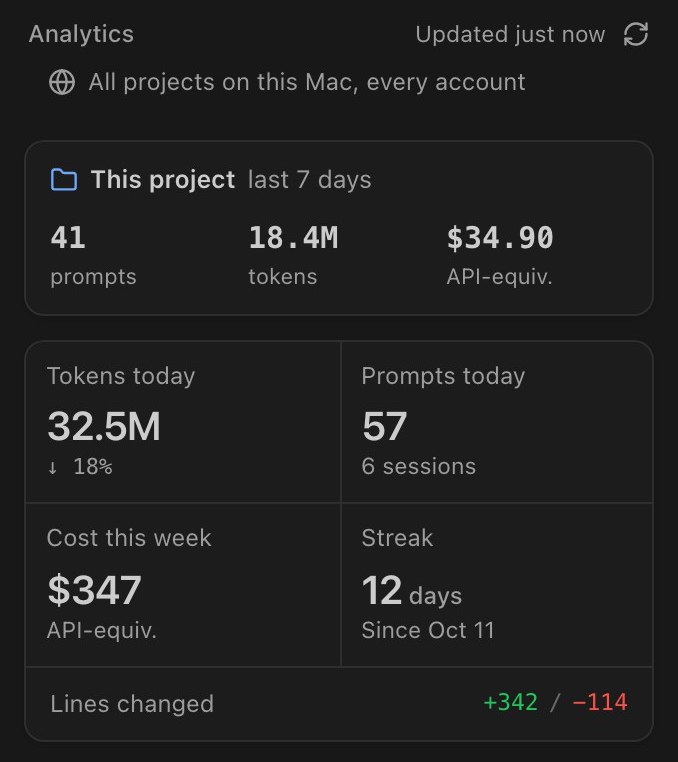
- Stats from your history. Tokens, prompts, estimated cost at API prices, streaks, busiest hours, and your top tools, models and projects, plus a view for the current project, all worked out on your computer from Claude Code's history. Layers also shows the current chat's model, how full its context is and what it has cost.
Before you choose it:
- It doesn't ask Anthropic for usage, so accounts you aren't using right now show their last known numbers.
- For daily or monthly tables in a terminal, or JSON for scripts, ccusage is still the better tool.
- It's tested on macOS, not yet on Windows or Linux. It needs VS Code 1.100 or newer and isn't available in Cursor, Windsurf or Antigravity yet.
- Some features need a small layer added to Claude Code's installed files. Layers asks first and keeps a backup, and Layers: Remove the layer (restore Claude Code's files) puts them back. Without the layer, the sidebar still shows your accounts, their last known usage and your stats.
Layers is free on the VS Code Marketplace. For the accounts side, see How to switch Claude accounts in VS Code.
How I checked
On 23 October 2026 I read each tool's own pages: the Marketplace listing and README for each extension, and the GitHub repository and docs for ccusage. Install counts are rounded and change daily. The tables repeat what each tool says about itself, not the results of my own tests. I picked the five extensions by install count, not by preference.
I make Layers, so read its rows with that in mind. If something here is wrong or out of date, tell me and I'll correct it.
Questions
Why doesn't ccusage match the limit in /usage?
They measure different things. /usage shows the percentage Anthropic tracks for your plan, a limit shared with claude.ai and Claude Desktop. ccusage counts the tokens in the Claude Code logs on your computer and groups them into its own 5-hour blocks, which start with your first message. Chats on claude.ai, your other computers and deleted logs never reach it.
Is the cost ccusage shows what I actually pay?
Not on a Pro or Max plan. ccusage works out cost from token counts and model prices, as Claude Code does for its own session cost, and Anthropic says that figure "isn't relevant for billing purposes" for Pro and Max subscribers. It's still useful for comparing days and projects. If you pay per token through the Claude Console, its Usage page is the real record. Where did my Claude Code tokens go? explains more.
Can I see my real 5-hour and weekly percentages in the terminal?
Yes. Run /usage, or set up a status line: on Pro and Max, Claude Code passes it rate_limits.five_hour and rate_limits.seven_day, each with a percentage and a reset time. ccusage's statusline shows costs, the current block, a burn rate and context use rather than these percentages. Claude-Code-Usage-Monitor, a free terminal dashboard (version 4.0.0, June 2026), can capture these percentages with its --statusline option.
Does Layers work in Cursor or Windsurf?
Not yet. Layers is waiting for approval on Open VSX, so for now it's for VS Code 1.100 or newer. It isn't for Claude Code in a separate terminal app, the Claude desktop app or claude.ai.
Sources
Every source was checked on 23 October 2026.
- Claude Code Docs: Use Claude Code in VS Code
- Claude Code Docs: Manage costs effectively
- Claude Code Docs: Customize your status line
- Claude Code Docs: Manage sessions
- Claude Code Docs: Explore the .claude directory
- Claude Help Center: How do usage and length limits work?
- Claude Help Center: Usage limit best practices
- GitHub: ccusage/ccusage
- GitHub: ccusage releases
- ccusage docs: Claude Code Data Source
- ccusage docs: Daily Usage
- ccusage docs: Blocks
- ccusage docs: Statusline Integration
- Visual Studio Marketplace: Claude Code Usage
- Visual Studio Marketplace: Claude Status
- Visual Studio Marketplace: Claude Code Usage Tracker
- Visual Studio Marketplace: Claude Usage Bar
- Visual Studio Marketplace: Claude Code and Codex Assist
- CCAssist: Claude Code and Codex Assist
- GitHub: Claude-Code-Usage-Monitor
- Visual Studio Marketplace: Layers for Claude Code