Claude Code usage limits: how to check what's left
How Claude Code's 5-hour and weekly limits work, where to see what's left, when each one resets, and what to do when you hit one.
On a paid Claude plan, Claude Code shares your plan's limits with claude.ai and the Claude desktop app: a session limit on a rolling five-hour window, and a weekly limit that resets at a fixed time set for your account. To see what's left and when each resets, run /usage in Claude Code (in VS Code it opens Account & usage) or open Settings > Usage on claude.ai.
How Claude Code's usage limits work
Claude Code comes with every paid plan (Pro, Max, Team and Enterprise), not the Free plan, and it shares the same usage limits as the rest of your plan. As of October 2026, a paid plan has two:
- A session limit that resets on a rolling five-hour window.
- A weekly limit that applies across all models and resets at a fixed time each week, assigned to your account (Pro, Max).
Four things catch people out:
- The limits are shared. Your use of claude.ai, Claude Code and Claude Desktop counts towards the same limit, and that includes Claude Code in VS Code and other IDEs. A long chat on claude.ai leaves less room for Claude Code, and the other way round.
- Both limits fill at once. Every request counts against both, so one heavy burst, such as a workflow that starts many agents, can use up your weekly limit before the five-hour window resets (Claude Code docs).
- There's no fixed message count. What you get depends on "the length and complexity of your conversations, the model you choose, and the features you use" (Claude pricing).
- Some models have their own limit. On Max plans and Premium seats, Fable models can use up to 50% of your weekly limit. Claude Code also has messages for an Opus limit and a Sonnet limit, which apply only to that model family.
On Team and seat-based Enterprise plans, each member has a per-seat allowance on the same five-hour and weekly windows, shared with Claude chat and Cowork. Usage-based Enterprise plans have no set usage limits and are charged by consumption.
Check your Claude Code usage in VS Code
In Anthropic's Claude Code extension, it takes one command.
- Run /usage. Type
/usagein Claude's prompt box and press Enter. It opens the Account & usage dialog for the account you're signed in to. - Read the bars. On a claude.ai plan there's a bar for each limit, such as the current session and the week, and each shows how long until it resets.
- See what used it. The dialog also suggests changes and shows how much usage came from each skill, subagent, plugin and MCP server, for the last day or week.
The bars are your plan's limits. The breakdown is approximate and only counts sessions on this computer, so usage from other devices or claude.ai isn't in it. For a quicker look, the sessions list in the Activity Bar has an Account & usage header with a usage meter (since Claude Code 2.1.257). The context indicator in the prompt box is something else: it shows how much of Claude's context window this conversation uses.
Check your Claude Code usage in the terminal
Run /usage (/cost and /stats are aliases). On a Pro, Max, Team or Enterprise plan it shows your plan's usage limits, activity stats and a breakdown of what counts against them. Press d or w to switch the breakdown between 24 hours and 7 days.
To keep your limits on screen, add them to a custom status line. You can ask Claude Code to write it:
/statusline show my 5-hour and weekly usage limits as percentagesThe script receives rate_limits.five_hour and rate_limits.seven_day, each with used_percentage and resets_at. These fields only appear for claude.ai Pro and Max subscribers, after the first response in a session.
Check your usage on claude.ai or in the desktop app
On claude.ai, open Settings > Usage. The Plan usage limits section at the top shows the current session (how much of the five-hour limit you've used, and the time left in it) and your weekly limits, for all models and for Fable if your plan includes it. In the Claude desktop app's Code tab, click the usage ring next to the model picker.
When do the 5-hour and weekly limits reset?
- The session limit resets on a rolling five-hour window.
- The weekly limit resets at a fixed time each week that's assigned to your account. That day and time stay "the same regardless of when you start using Claude or when your subscription begins" (Claude Help Center).
The bars in /usage and in Settings > Usage show when each limit resets, and so does the message you get when one runs out:
You've hit your session limit · resets 3:45pm
You've hit your weekly limit · resets Mon 12:00am
Now and then Anthropic gives eligible plans a limit reset. It puts your five-hour or weekly limit back to full when you use it, with the Reset for free button in Settings > Usage on the web or in the desktop app. The button isn't in Claude Code itself.
How Claude Code's limits changed in 2026
The main changes this year, in order:
| When | What changed |
|---|---|
| 6 May 2026 | Five-hour limits in Claude Code doubled for Pro, Max, Team and seat-based Enterprise plans, and the peak-hours limit reduction ended for Pro and Max (Anthropic). |
| 13 May to 13 September 2026 | A promotion made weekly limits in Claude Code 50% higher on Pro, Max and Team plans and for legacy seat-based Enterprise users (Claude Help Center). |
| Since 14 September 2026 | Weekly limits in Claude Code are 25% higher than before the promotion, for Pro, Max, Team and seat-based Enterprise plans (Claude Help Center). So they went down on 14 September, but not back to where they started. |
What to do when you hit a Claude Code limit
Claude Code can warn you first, with a line such as You've used 85% of your session limit · resets 3:45pm. When a limit runs out, it blocks requests until the reset time in the message. Your options:
- Wait, and let Claude Code carry on. In an interactive session signed in with a claude.ai subscription, Claude Code 2.1.234 or later waits and continues the task on its own after the reset, as long as you keep the session open. It won't start the wait by itself when the reset is more than 24 hours away, as a weekly one can be; pick Wait here, then continue automatically from
/rate-limit-optionsinstead. Background sessions and-pruns don't wait. - Switch models, but only for a model limit. The session and weekly limits cover every model, so
/modelwon't help there. After an Opus or Sonnet limit, a model outside that family keeps you working. - Turn on usage credits. On Pro and Max,
/usage-creditsopens Settings > Usage, where you can turn them on and set a monthly spending cap. On Team and Enterprise, members without billing access can ask their admin. Usage credits are billed at standard API rates and cover Claude Code too. - Upgrade your plan.
/upgradeopens the upgrade page. As of October 2026, Max starts at $100 a month and gives 5x or 20x more usage per five-hour session than Pro. - Pay as you go. Anthropic also suggests switching to a Claude Console account and buying API usage credits for heavy stretches. Usage there is metered per request, so there's no reset to wait for.
If a five-hour limit lands mid-reply, Claude Code 2.1.277 or later may keep working briefly to reach a sensible stopping point, under a small, capped wrap-up allowance. It may not be enough to finish the task, and it's still rolling out.
See every account's limits at once with Layers
Each view above shows the account you're signed in to. If you have more than one, such as a work account and a personal one, Layers can show them side by side. I make Layers. It's a free VS Code extension that works on top of Anthropic's Claude Code extension, and it's unofficial: Anthropic doesn't make or endorse it.
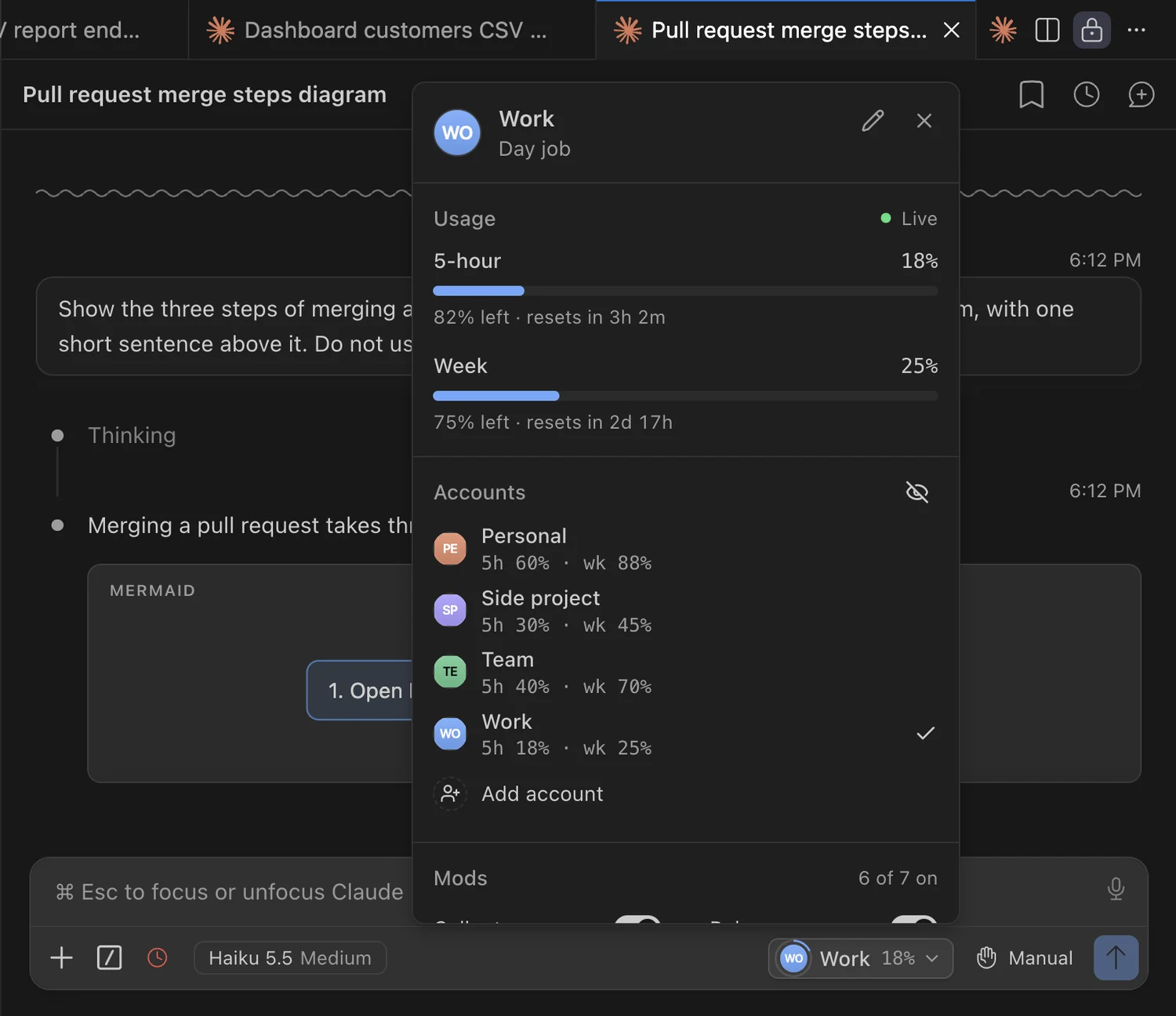
- The Layers button in Claude's prompt box shows the account you're on and its 5-hour usage. Click it for every account's 5-hour and weekly usage.
- The Overview tab in the Layers sidebar shows 5-hour and weekly usage with reset times, and a 7-day trend.
- A heads-up appears when the account you're using passes 80% of a limit, and again at 95%.
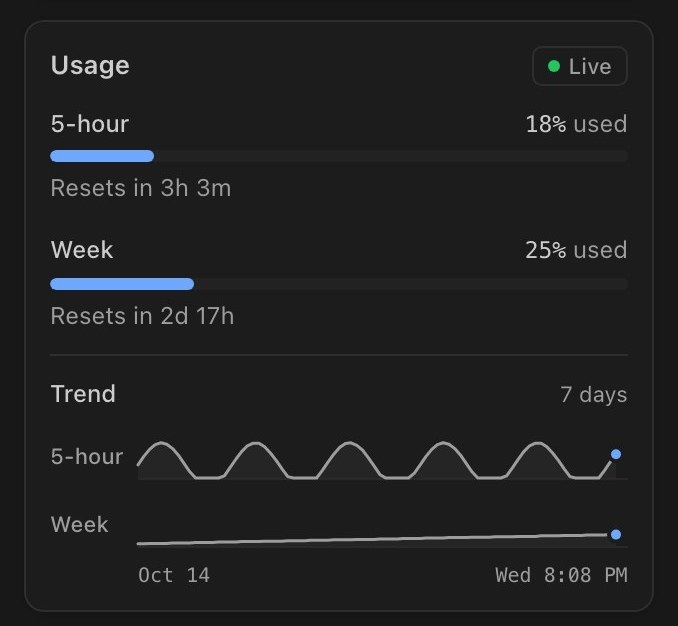
Layers doesn't give you more usage. It shows what each account has left, worked out on your computer: no servers, no sign-up, no tracking. It changes Claude Code's installed files only after asking, keeps a backup, and Layers: Remove the layer (restore Claude Code's files) puts them back. It needs VS Code 1.100 or newer and runs in VS Code, not in the terminal, the desktop app or claude.ai. It's tested on macOS, not yet on Windows or Linux. For how Claude Code handles several accounts, see how to switch Claude accounts in VS Code.
Questions
Do claude.ai and Claude Code share the same usage limits?
Yes. Anthropic says "all activity in both tools counts against the same limits", whether you use Claude Code in the terminal or in an IDE.
Why does my Claude Code limit run out so fast?
Claude Code sends your whole conversation with every request, so a short question late in a long session still draws on everything before it. Subagents send requests of their own, and a message after a break longer than the prompt cache lasts reprocesses the whole conversation. The breakdown in /usage shows what's driving it, and /clear starts fresh between unrelated tasks. For more, see where your Claude Code tokens go.
Should I use /status or /usage to check my Claude Code usage?
Use /usage. Anthropic's Pro and Max help article still says to monitor your remaining allocation with /status, but the Claude Code docs list /usage for plan usage limits. /status opens the Status tab, with your version, model, account and connectivity.
Does the Claude Code weekly limit reset on my billing date?
No. It resets at a fixed time each week that's assigned to your account, and it isn't tied to when your subscription began. Settings > Usage on claude.ai and /usage in Claude Code show when.
Sources
I checked every source on 23 October 2026, the day this page was first published.
- Claude: Plans & pricing
- Claude Help Center: What is the Pro plan?
- Claude Help Center: What is the Max plan?
- Claude Help Center: How do usage and length limits work?
- Claude Help Center: Use Claude Code with your Pro or Max plan
- Claude Help Center: Claude Fable models on your plan
- Claude Help Center: Usage limit best practices
- Claude Help Center: What is a limit reset?
- Claude Help Center: Claude Code May–August 2026 weekly limits promotion
- Claude Help Center: Manage usage credits for paid Claude plans
- Claude Help Center: Claude Code Wrap-Up Allowance
- Claude Code Docs: Use Claude Code in VS Code
- Claude Code Docs: Commands
- Claude Code Docs: Manage costs effectively
- Claude Code Docs: Customize your status line
- Claude Code Docs: Error reference
- Claude Code Docs: Desktop application
- Claude Code Docs: Interactive mode
- Claude Code Docs: Claude Code changelog
- Anthropic: Higher usage limits for Claude and a compute deal with SpaceX