Where did my Claude Code tokens go?
How to see what Claude Code spent your tokens on, why long sessions add up, and what its dollar figures mean for what you actually pay.
Token use grows with context. Claude Code sends your whole conversation with every request, so a short question in a long session still draws on all of it. To see where yours went, run /usage: on a paid plan it splits recent usage by skills, subagents, plugins and MCP servers. /context shows what fills the current chat. Dollar figures are estimates at API list prices, not a bill.
Check Claude Code token usage with /usage
Claude Code answers most of this itself, in three places:
- In the VS Code panel,
/usageopens the Account & usage dialog. On a paid plan, it shows each limit and its reset time, then what share of recent usage went to each skill, subagent, plugin and MCP server over the last day or week. With an API key, it shows the session's cost and tokens instead (VS Code docs). - While you work, the prompt box shows how full the context window is. Click the agent count to see each subagent's status, running time and token count (VS Code docs).
- In the terminal,
/usagealso has a Session block: estimated cost, duration, lines changed, and tokens per model, split into input, output, cache reads and cache writes. Pressdorwto switch the breakdown between 24 hours and 7 days (Anthropic's cost guide).
The breakdown is the real answer to "where did my tokens go". Each recommendation starts with the share of recent usage it applies to, such as 25% Trim ~/code/api/CLAUDE.md · 49k tokens per request. From version 2.1.305, press f in the terminal, or click the Fix button in VS Code, to have Claude Code act on the ones it can (cost guide, VS Code docs).
For a longer view, open the Stats tab in the terminal, without leaving VS Code:
- Open VS Code's terminal. Choose Terminal > New Terminal, or press
Ctrl+`, which uses Control on a Mac too (VS Code's terminal guide). Runningclaudethere needs the standalone install, because the extension doesn't add it to your PATH (VS Code docs). - Start Claude Code. Run
claude. It shares conversation history with the extension (VS Code docs). - Type /stats. It opens
/usageon the Stats tab (commands): token totals, a daily token chart, your favourite model, your streak and an activity heatmap (changelog). - Type /context. It draws the context window as a coloured grid, with suggestions when tools or memory files fill much of it (commands).
In the terminal, a status line from /statusline can keep context and cost on screen, though its cost "may differ from your actual bill" (status line docs).
Why long sessions use so many tokens
Claude Code sends your full conversation with every request, and each time Claude uses tools, another request carries the results. Caching makes the repeats cheaper, but a one-line question in a session open all day still draws usage for the whole conversation (cost guide).
The same guide names other usual causes:
- Breaks. Your first message after a break longer than the cache lifetime reprocesses the whole context. In VS Code, a clock next to the context indicator estimates the time the cache has left (VS Code docs).
- Subagents and workflows. Each one sends its own requests on top of the main chat's.
- Turns you didn't type. Scheduled tasks, goal check-ins and messages from your other sessions can start turns in an idle session, each sending the full context.
- Compacting.
/compactreads the conversation it summarises, so on a big chat it's a big request./clearcosts nothing.
What helps, from its reduce token usage section:
- Clear between unrelated tasks. Name the chat with
/renamefirst, so/resumecan find it later. - Match the model to the job. Sonnet "handles most coding tasks well and costs less than Opus". Switch with
/model. - Lower the effort for simple work. Thinking tokens are billed as output, and
/effortturns reasoning down. - Trim what loads every time. Keep CLAUDE.md under 200 lines, move workflow instructions into skills, which load only when used, and turn off unused MCP servers in
/mcp.
Where Claude Code keeps the numbers
The breakdown, the Stats tab and the tools below work from history on your computer, mainly one transcript file per chat:
~/.claude/projects/<project>/<session-id>.jsonl<project> is your working folder's path with everything except letters and digits turned into dashes (sessions docs). Worth knowing:
- They're deleted after 30 days unless you change
cleanupPeriodDays(settings reference). The totals that/usageshows are kept instats-cache.json, which the cleanup leaves alone (.claude directory docs). - They're plain text. They aren't encrypted, and anything Claude's tools read lands in them, a
.envfile included (.claude directory docs). - The format is internal. It "changes between versions" (sessions docs), so outside tools that read it, Layers included, have to keep up.
- They're per folder and per computer. Each
CLAUDE_CONFIG_DIRfolder keeps its own (.claude directory docs), and the/usagebreakdown leaves out "usage from other devices or claude.ai" (cost guide), as does any tool that reads these files.
Free command-line tools: ccusage and others
For totals by day, month or session, free tools add up the same files. One is ccusage, "a fast local CLI for tracking tokens and estimated costs" that works "without uploading your data" (ccusage). It runs without an install (getting started):
npx ccusage@latest                  # daily report, every coding CLI it finds
npx ccusage@latest claude monthly   # Claude Code, by month
npx ccusage@latest claude session   # Claude Code, by session
It reads ~/.claude/projects/ and ~/.config/claude/projects/. If you keep a settings folder per account, list the folders in CLAUDE_CONFIG_DIR, separated by commas. That replaces the defaults, so include ~/.claude too (ccusage: Claude Code data source):
CLAUDE_CONFIG_DIR="$HOME/.claude,$HOME/.claude-work" npx ccusage@latest claude monthlyClaude Code Usage Monitor is another option: a live terminal view with burn rate and forecasts. Install it with uv tool install claude-monitor, then run claude-monitor (GitHub). For tools that work inside VS Code, see ccusage alternatives.
Claude Code usage stats inside VS Code, with Layers
If you'd rather see your history in VS Code's sidebar, there's Layers for Claude Code. I make it. It's a free extension that sits on top of Anthropic's Claude Code extension, and it's unofficial: Anthropic doesn't make or support it.
Its Analytics section is worked out on your computer from the history Claude Code keeps: tokens, prompts, estimated cost at API prices, streaks, your busiest hours, your top tools, models and projects, and a This project view.
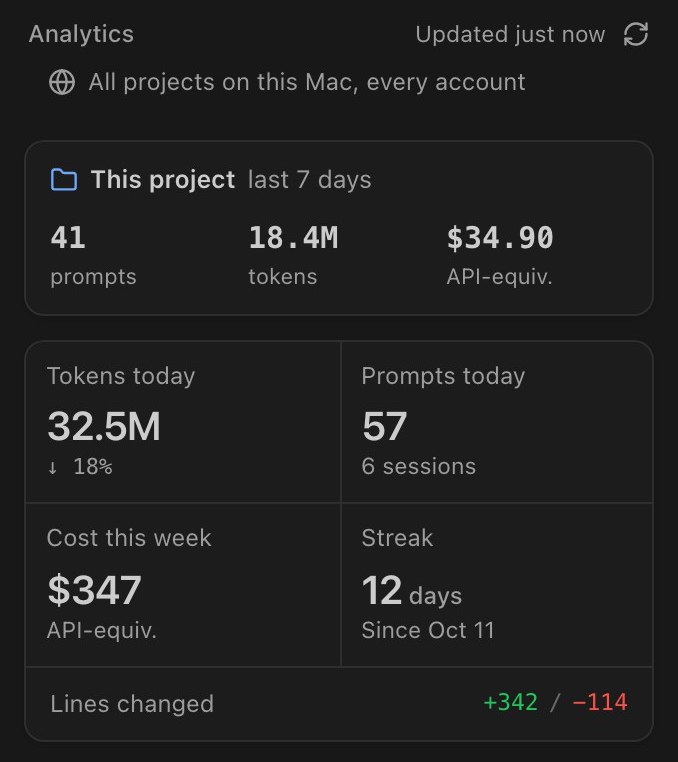
The Overview tab also shows the chat you're in: its model, how full its context is and what it has cost so far. Helpers Claude starts appear live while they run.
- Same blind spots. Layers reads the same local history, so it doesn't count claude.ai or your other computers, and its costs are API-price estimates, not your bill.
- It stays on your computer. No servers, no sign-up, no tracking.
- It asks first. Stats work without changing anything. The live details need one Apply, which asks before it changes Claude Code's installed files and keeps a backup. Layers: Remove the layer (restore Claude Code's files) puts them back, and uninstalling does the same on the next restart.
- Where it runs. The Claude Code extension in VS Code 1.100 or newer. Tested on macOS; Windows and Linux are untested. Not the terminal, the desktop app or claude.ai.
Layers is on the VS Code Marketplace, and VS Code installs Claude Code along with it.
Estimated cost vs. what you pay each month
Claude Code works out its dollar figures on your computer, from token counts at list price (cost guide). What that number means depends on how you pay:
| How you pay | What you pay | What the dollar figure means |
|---|---|---|
| Pro or Max plan | The plan price. As of October 2026, Pro is $20 a month ($17 a month billed yearly) and Max is $100 or $200 a month (pricing, Max plan). | Not your bill: Anthropic says it "isn't relevant for billing purposes" for Pro and Max (cost guide). |
| Usage credits on Pro or Max | Usage past your limits, at standard API rates (pricing). | An estimate. See this month's credit spend on claude.ai under Settings > Usage (cost guide). |
| API key or Claude Console | Every token, at API prices. | An estimate. For billing, see the Usage page in the Claude Console (cost guide). |
| Team or Enterprise | Your organisation's seats. On Team and seat-based Enterprise plans, your usage draws on your seat's allowance. On usage-based Enterprise plans, usage is billed at API rates (Team and Enterprise help). | An estimate at list price, unless your admin has set your organisation's rates. Usage inside a seat allowance isn't metered in dollars (cost guide). |
A big token count isn't always expensive. Much of it can be cache reads: a sample session in Anthropic's cost guide shows 940,000 cache-read tokens next to 1,200 input tokens. As of October 2026, Sonnet 5.5's API price is $2 per million input tokens but $0.10 per million cache reads (pricing).
For budgeting API use, Anthropic's guide puts the average across enterprise deployments at around $13 per developer per active day and $150–250 per developer per month, as of October 2026 (cost guide). On a plan, what you can do varies with your conversations, model and features, "so there's no fixed message count" (pricing). To see what's left of your limits, read Claude Code usage limits.
Questions
Is the cost in Claude Code's /usage what I pay?
Not on Pro or Max, where Anthropic says it "isn't relevant for billing purposes". With an API key it's an estimate at list price, and the Usage page in the Claude Console has the billing figure (cost guide).
How much does Claude Code cost per month?
It comes with every paid plan, not Free. As of October 2026, Pro is $20 a month ($17 a month billed yearly) and Max is $100 or $200 a month (pricing, Max plan). With an API key you pay per token instead; as of October 2026, Anthropic's enterprise average is $150–250 per developer per month (cost guide).
Does /usage count claude.ai or my other computers?
The limit bars show your plan's limits, which Claude on the web, desktop and mobile share with Claude Code (pricing). The breakdown under them counts only this computer's sessions (cost guide), and so do ccusage and Layers.
How do I keep Claude Code history longer than 30 days?
Set cleanupPeriodDays in ~/.claude/settings.json to a larger number of days. It can't be 0 (settings reference).
{
  "cleanupPeriodDays": 90
}
The transcripts are plain text, so a longer history leaves more of what Claude's tools read on your disk (.claude directory docs).
Sources
I checked every source below on 23 October 2026.
- Claude Code Docs: Manage costs effectively
- Claude Code Docs: Use Claude Code in VS Code
- Claude Code Docs: Commands
- Claude Code Docs: Customize your status line
- Claude Code Docs: Manage sessions
- Claude Code Docs: Explore the .claude directory
- Claude Code Docs: All settings (cleanupPeriodDays)
- Claude Code Docs: Claude Code changelog
- Claude: Plans & pricing
- Claude Help Center: What is the Max plan?
- Claude Help Center: Use Claude Code with your Team or Enterprise plan
- Visual Studio Code Docs: Terminal Basics
- ccusage: home page
- ccusage: Getting Started
- ccusage: Claude Code Data Source
- GitHub: Claude Code Usage Monitor